Backend Manager
The Backend Manager is the unified dialog for managing all backend configurations. Through it, you can add, edit, delete, and verify backend connections.
How to Open
- Menu: Tools → Backend Manager
Interface Layout
┌─────────────────────────────────────────────────┐
│  Backend Manager                        [Cancel] [Save] │
├─────────────────────────────────────────────────┤
│  [ACP] [SkillRunner] [Generic HTTP]              │
├─────────────────────────────────────────────────┤
│  ACP                                   [Add ACP] │
│                                                 │
│  ┌─ Display Name: [________]  ─┐               │
│  │  Command:      [________]    │               │
│  │  Arguments:    Arguments Editor │             │
│  │  Env Variables: Env Var Editor  │  [Remove]  │
│  └──────────────────────────────┘               │
│                                                 │
│  ┌─ Display Name: [________]  ─┐               │
│  │  ...                       │  [Remove]      │
│  └──────────────────────────────┘               │
└─────────────────────────────────────────────────┘
General Operations
Tab Switching
There are three tabs at the top of the dialog: ACP, SkillRunner, and Generic HTTP. Click a tab to switch to the corresponding backend type configuration area. Each tab lists all configured backends of that type.
Adding a Backend
Click the Add button under a tab to create a new blank configuration row for that type. Fill in the fields and click Save in the bottom-right corner to apply.
Editing a Backend
Modify fields directly in the configuration row. Unsaved changes will not take effect.
Deleting a Backend
Click the Remove button within a configuration row to delete that backend. Deletions take effect after saving.
Save & Cancel
| Button | Location | Function |
|---|---|---|
| Save | Bottom-right of the dialog | Save all changes and close the dialog |
| Cancel | Bottom-right of the dialog (next to Save) | Discard all unsaved changes and close the dialog |
If there are unsaved changes before closing the dialog, a confirmation prompt will appear.
ACP Tab
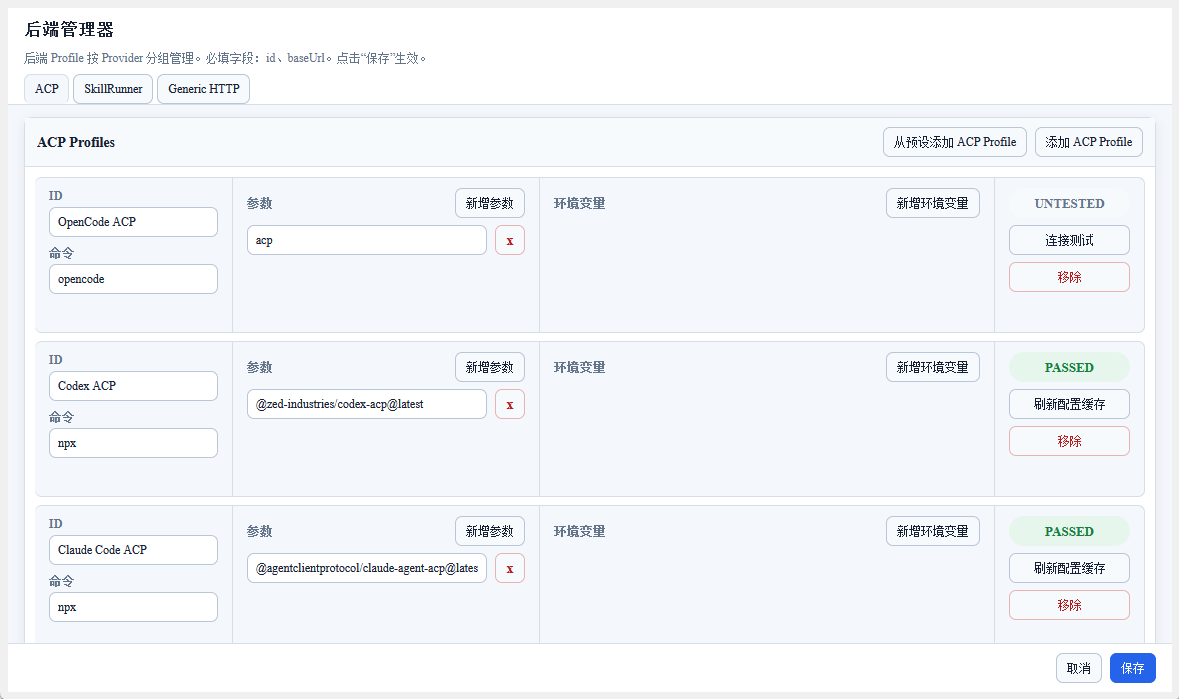
ACP backends are locally running agent subprocesses. The configuration specifies the launch command, and the plugin manages the process lifecycle.
Field Descriptions
| Field | Required | Description |
|---|---|---|
| Display Name | Yes | Display name for the backend, used to identify it in the Dashboard and sidebar |
| Command | Yes | Command to start the ACP backend (e.g., npx -y opencode-ai@latest acp) |
| Arguments | No | Additional arguments for the command, added one by one through the arguments editor |
| Environment Variables | No | Additional environment variables, added one by one through the environment variable editor (key-value pairs) |
ACP Presets
There is an Add from Preset dropdown at the top of the ACP tab. After selecting a preset, the plugin automatically fills in the command and common parameters.
Built-in presets:
| Preset | Command |
|---|---|
| OpenCode | opencode acp |
| Codex | npx -y @agentclientprotocol/codex-acp@latest |
| Claude Code | npx -y @agentclientprotocol/claude-agent-acp@latest |
| Gemini CLI | gemini --experimental-acp |
| Qwen Code | qwen --acp --experimental-skills |
You can still manually modify any field after selecting a preset.
Action Buttons
| Button | Function |
|---|---|
| Refresh Runtime Options | Re-detect the backend's model list, mode list, and other runtime capabilities |
Arguments Editor
Add Argument: Click the add button and enter the argument content. Remove Argument: Click the remove button next to the argument.
Environment Variable Editor
Add Environment Variable: Click the add button and fill in the Key and Value. Remove Environment Variable: Click the remove button next to the variable.
SkillRunner Tab
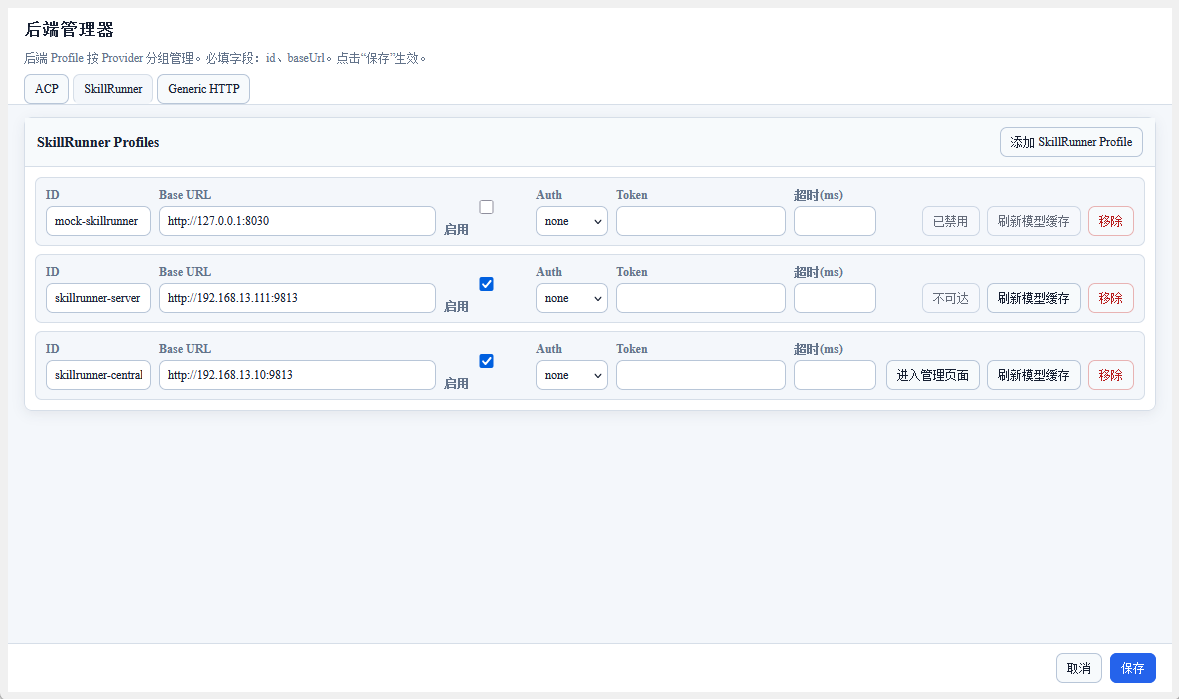
SkillRunner backends communicate with Skill-Runner services via HTTP API, supporting both local and remote deployment modes.
Field Descriptions
| Field | Required | Description |
|---|---|---|
| Display Name | Yes | Display name for the backend |
| Base URL | Yes | Address of the Skill-Runner service (e.g., http://127.0.0.1:29813) |
| Authentication | No | Select none (no authentication) or bearer (Bearer Token authentication) |
| Auth Token | No | Bearer Token (only fill in when authentication is set to bearer) |
| Timeout | No | Request timeout (milliseconds) |
Action Buttons
| Button | Function |
|---|---|
| Open Management UI | Open the Skill-Runner built-in Web management interface |
| Refresh Model Cache | Refresh the model list cache for this backend |
Generic HTTP Tab
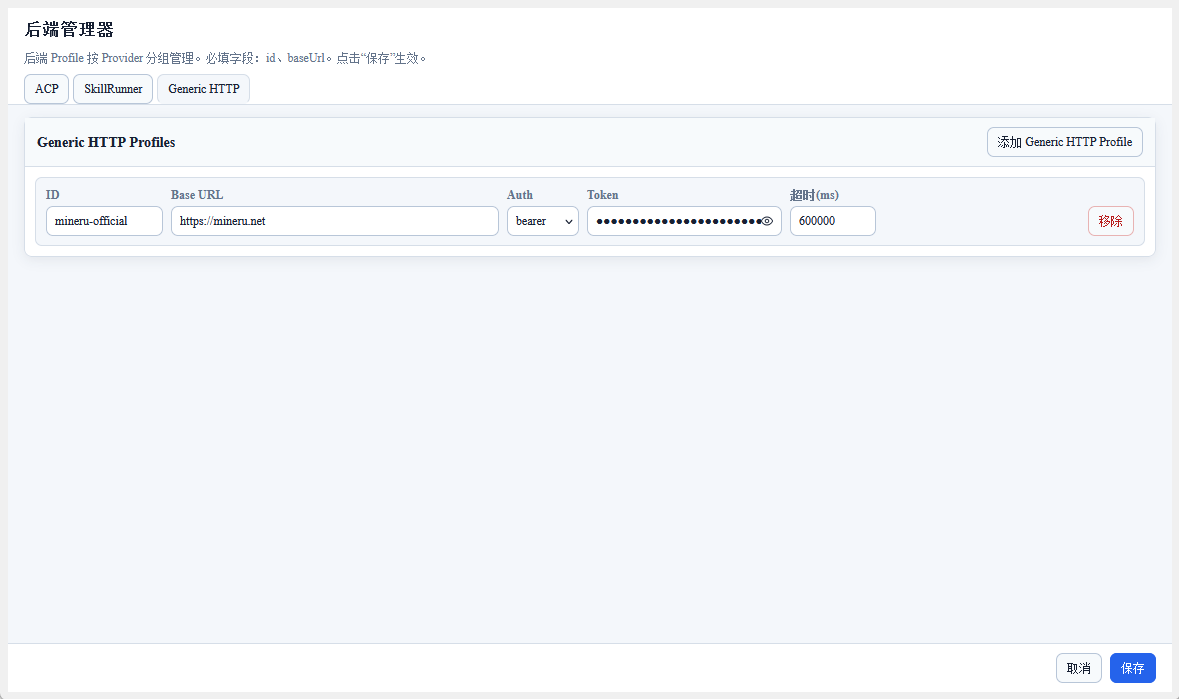
Generic HTTP backends are used to send requests to any HTTP service, primarily for calling external APIs (such as the MinerU document parsing service).
Field Descriptions
| Field | Required | Description |
|---|---|---|
| Display Name | Yes | Display name for the backend |
| Base URL | Yes | Base address of the HTTP service |
| Authentication | No | Select none or bearer |
| Auth Token | No | Bearer Token (only fill in when authentication is set to bearer) |
| Timeout | No | Request timeout (milliseconds) |
Backend Capability Detection
After saving a backend, the plugin automatically detects backend capabilities in the background:
- ACP: Checks command availability, connection initialization, model list, mode list, and computes a configuration fingerprint to detect subsequent changes
- SkillRunner: Checks API availability, engine list, model list
- Generic HTTP: Checks HTTP endpoint reachability
Detection results are displayed as backend status indicators in the Dashboard and sidebar.
Next Steps
After configuration is complete, you can:
- Use the ACP backend in ACP Chat or ACP Skills
- Manage SkillRunner runs through the SkillRunner Tab
- Use the configured backends to execute tasks in the Workflow List and Dashboard