Synthesis Workbench Overview
Synthesis Workbench is a deep literature analysis platform provided by Zotero Agents. It transforms your library into a structured knowledge network, supporting topic synthesis, citation analysis, concept management, and controlled vocabulary management.
How to Open
- Open Dashboard / Synthesis Workspace via the toolbar button or menu
- Switch to the Synthesis view in the Workspace Tab
All Surfaces (Pages)
Synthesis Workbench consists of 8 surfaces, each providing a different functional view:
| Surface | Function | Docs |
|---|---|---|
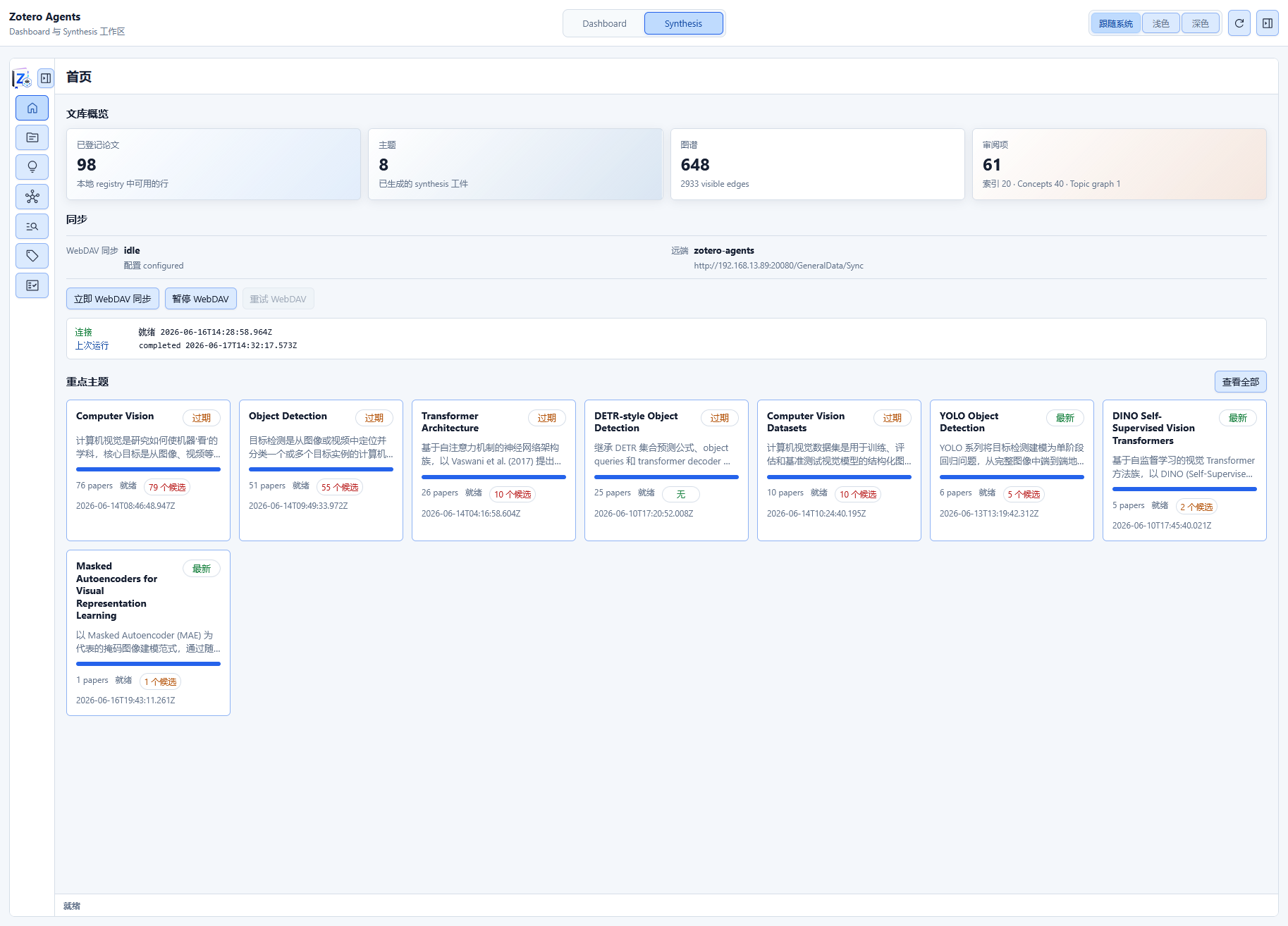
| Home | Library overview dashboard: library insights (registered papers / topic count / graph nodes), Git sync status panel, trending topic card list | Details |
| Topics | Topic list and management: 3 view modes (graph / grid / list), create and update topics, topic search and sorting | Details |
| Index | Canonical Reference index: paper registry view (paper list + citation rows + binding status), canonical reference view (search / merge / redirect / deduplicate) | Details |
| Review | Review hub: 3 sub-tabs — citation match review (accept/reject binding proposals), concept review, topic graph relationship review | Details |
| Graph | Citation graph visualization (force-directed / radial / component — 3 layouts), with topic filtering and node/edge interaction | Details |
| Tags | Controlled tag vocabulary management + automatic tagging suggestion approval | Details |
| Concepts | Concept knowledge base management: four-layer structure of concepts / senses / aliases / relations, overlayable onto the topic graph and reader | Details |
| Reader | Topic reader: full Topic Detail page with 8 sub-pages (Overview, Taxonomy, Claims, Compare, Future Directions, Coverage, References, Report) | Details |
Core Concepts
Canonical Store
The Canonical Store is the underlying knowledge graph storage for the Synthesis system. It stores content-addressable JSON files in the Zotero data directory.
Storage location: <Zotero data directory>/zotero-agents/data/synthesis/
Directory structure:
synthesis/
├── topics/             # Structured artifacts for topic synthesis
├── concepts/           # Concept knowledge base
├── topic-graph/        # Topic graph nodes and edges
├── citation-graph/     # Citation graph snapshots
├── tags/               # Controlled tag vocabulary
├── sync/               # Git sync working tree
└── state/              # Runtime state (transactions, receipts, caches, etc.)
Each file uses a JSON envelope format (CanonicalEnvelope) that includes a schema ID, version number, timestamp, and schema-validated data body. Write operations use transactional semantics: data is first staged in the transaction directory, promoted to the canonical location upon successful validation, and automatically rolled back on failure.
Reference Sidecar
A Reference Sidecar is an index of the attached artifacts for each paper. When a workflow processes a literature item and generates a digest, reference list, and citation analysis, these artifacts are attached to the item as structured notes (Zotero Notes). The Sidecar system scans these notes and records artifact status (complete / partial / missing) into the index.
Sidecar scan cycle: The sidecar is triggered to scan at the following times:
- After a workflow execution completes and writes artifacts
- When an explicit sidecar refresh operation is triggered
- When the system detects stale sidecar data at startup
Artifact types:
| Artifact | Description |
|---|---|
digest | Paper digest (Markdown) |
references | Reference list (JSON) |
citation_analysis | Citation analysis report (JSON) |
Sidecar data serves as the primary input to the Canonical Reference Index — the system extracts citation records from the references artifact, establishes canonical references, and then attempts to match and bind them to library items.
Data Flow
Zotero Library
    │
    ├──→ Workflow Execution (Literature Analysis / Deep Reading)
    │         │
    │         ↓
    │   Artifact Notes (Digest / References / Citation Analysis)
    │         │
    │         ↓
    │   Reference Sidecar ← Scan artifact status
    │         │
    │         ├──→ Canonical Reference Index
    │         │         │
    │         │         ├──→ Citation Binding (Bind to Zotero Items)
    │         │         └──→ Citation Graph
    │         │
    │         └──→ Topic Synthesis
    │                   │
    │                   ├──→ Topic Graph (Topic Relationships)
    │                   └──→ Concept Associations (Concept KB)
    │
    └──→ Git Sync ←→ Remote Repository (Version Control and Backup)
Prerequisites
Using Synthesis Workbench requires:
- A configured Skill-Runner backend (for running synthesis workflows)
- Paper items already present in the library
Next Steps
- Home Dashboard — View library overview and sync status
- Tags Management — Manage the controlled tag vocabulary
- Index & Citation Graph — Learn about reference indexing and citation networks
- Create Topic Synthesis — Create topic analyses
- Review Hub — Review citation matches, concepts, and topic graph proposals
- Concept Knowledge Base — Manage core concepts
- Git Sync — Configure data sync and backup