Preferences
Zotero Agents settings are located at Zotero → Settings → Zotero Agents (Windows/Linux) or Zotero → Preferences → Zotero Agents (macOS).
Workflow Settings
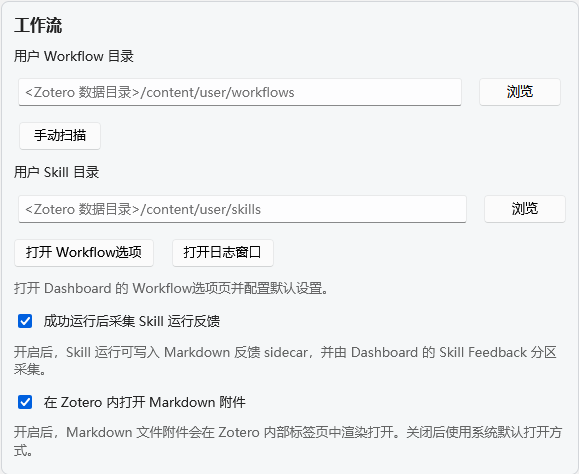
Workflow Directory
- Path: Custom directory for storing workflows
- Default Location:
<Zotero Data>/zotero-agents/data/workflows - Scan Workflows: Click the button to rescan the directory and load all workflows
Skill Directory
- Path: Custom directory for storing skill packages
- Scan: Click the button to scan the directory and load skills
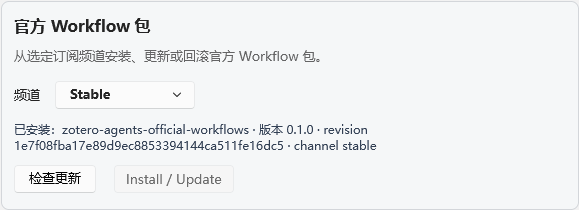
Official Workflow Packages
Official workflows are distributed through separate Content Packages, decoupled from the plugin itself.
| Setting | Type | Description |
|---|---|---|
| Install Official Workflow Packages | button | Download and install the latest official package from GitHub / Gitee |
| Check for Updates | button | Check if a new version is available remotely |
| Status | text | Displays the currently installed package version and channel information |
Update Channels
You can choose from three update channels:
| Channel | Description |
|---|---|
| stable | Stable release (recommended) |
| beta | Beta release, includes upcoming features |
| dev | Development release, includes the latest experimental changes |
After switching channels, click Check for Updates to get the latest package for that channel.
Runtime Settings
- Enable Skill Run Feedback: When enabled, skill runs can write Markdown feedback sidecars, which are collected by the Dashboard Skill Feedback panel
Host Bridge
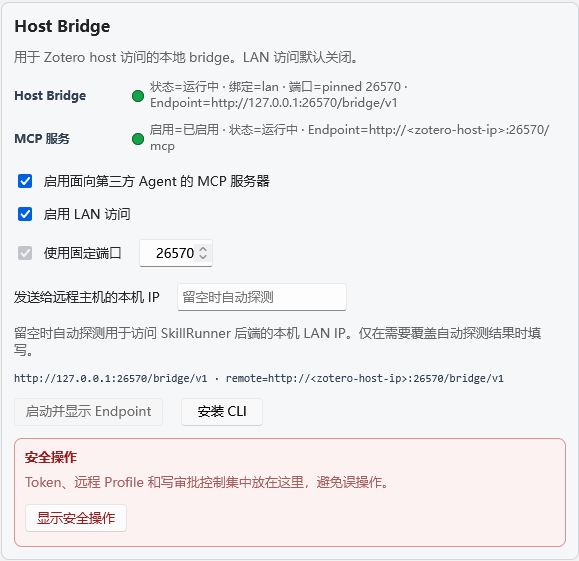
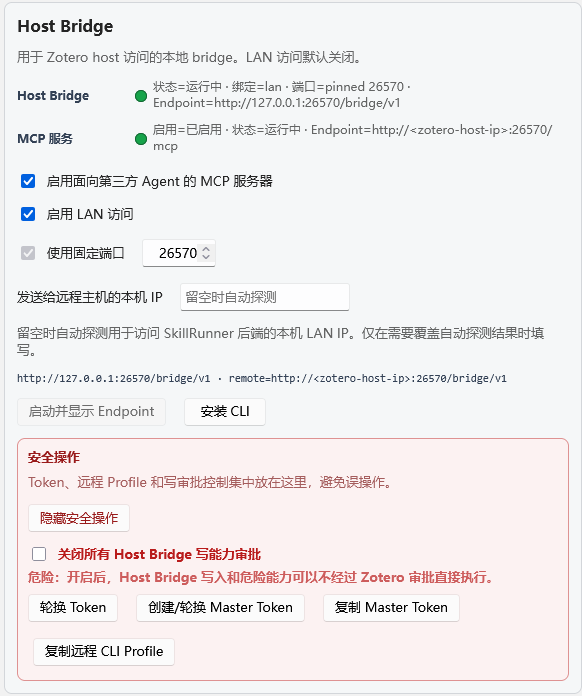
An embedded HTTP service for external AI tools and CLI access to the Zotero library. See Host Bridge for details.
| Setting | Type | Description |
|---|---|---|
| Enable MCP Server | boolean | Also expose the MCP protocol interface |
| Disable Write Approval | boolean | Dangerous: bypass all write approvals |
| Enable LAN Access | boolean | Allow LAN access |
| Fixed Port | boolean | Use a fixed port instead of a random one |
| Port Number | number | Fixed port value (default 26570) |
| LAN IP | string | Manually specify the advertised IP (leave empty for auto-detection) |
Action buttons:
- Start/Show Endpoint: Start the service and display the endpoint URL
- Rotate Token: Rotate the session token
- Create/Rotate Master Token: Generate a persistent token
- Copy Master Token: Copy to clipboard
- Copy Remote CLI Profile: Get the remote connection configuration
- Install CLI: One-click install
zotero-bridge. On Linux and macOS, only user directories are selected automatically; if neither user directory is inPATH, the CLI is installed to~/.local/binand the page shows shell-profile commands to enable the bare command.
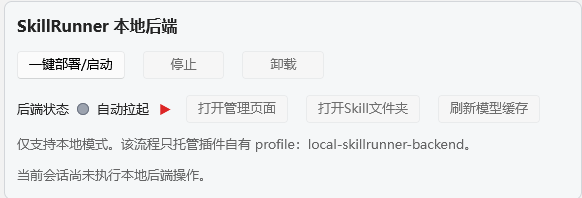
SkillRunner Local Backend
⚠️ This mode is only suitable for users who are completely unfamiliar with installing agent tools and cannot use Docker. If you already have an ACP agent or can use Docker, please prefer the ACP backend or Docker-deployed Skill-Runner.
The local Skill-Runner starts and stops with the plugin — closing Zotero terminates all tasks. Runtime management features:
| Feature | Description |
|---|---|
| One-click Deploy | Download and install the latest version of the Skill-Runner runtime |
| Start | Start the local Skill-Runner process |
| Stop | Stop the running local Skill-Runner |
| Uninstall | Remove the installed runtime files |
| Open Management UI | Open the backend management interface in the plugin |
| Open Skills Folder | Open the directory where skill files are stored |
| Refresh Model Cache | Update the backend's model list cache |
| Open Debug Console | View backend log output |
Backend Manager
Manage all backend profiles:
- Grouped by provider (SkillRunner, ACP, Generic HTTP)
- Add/edit/delete backends
- Each backend can be configured with: ID, Base URL, Bearer Token, Timeout
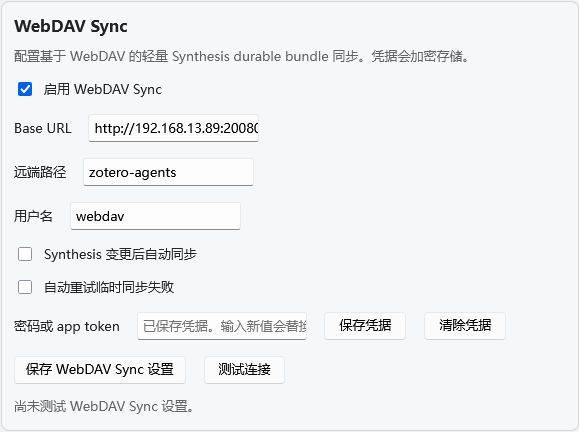
WebDAV Sync
Cross-device synchronization solution for the Synthesis Workbench, replacing the deprecated Git Sync. See WebDAV Sync for details.
| Setting | Type | Default | Description |
|---|---|---|---|
| Enable WebDAV Sync | boolean | false | Main switch |
| Base URL | string | "" | WebDAV server address |
| Remote Path | string | "zotero-agents" | Remote directory path |
| Username | string | "" | WebDAV username |
| Password/Token | encrypted | "" | Password or app token (AES-256-GCM encrypted) |
| Auto Sync | boolean | false | Automatically trigger sync after each change |
| Auto Retry | boolean | false | Automatically retry on failure |
Action buttons: Save Settings, Save Credential, Test Connection.
Runtime Data
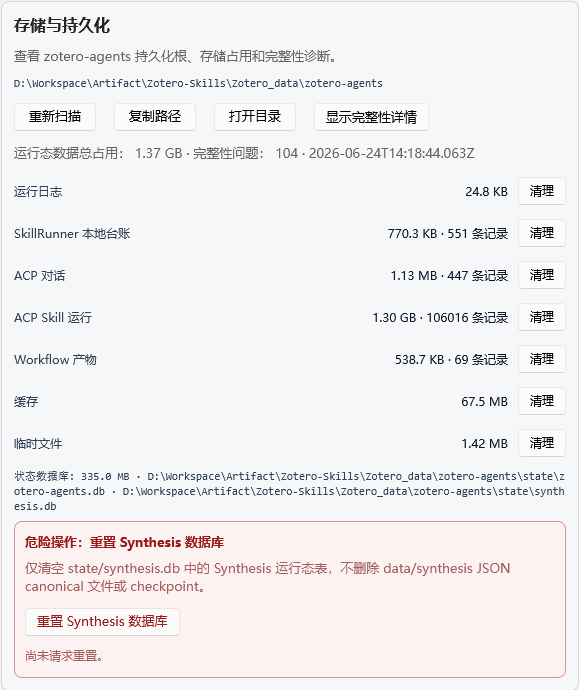
Displays the persistence root directory, runtime usage, and integrity diagnostics:
- Persistence Root:
<Zotero Data>/zotero-agents/data/ - Synthesis Canonical Store: Local SQLite + persistent packages
- Directory Sizes: data/, cache/, logs/, tmp/, etc.
- Diagnostics Panel: Detects filesystem issues (e.g., WAL files not cleaned up)
Note: The Synthesis Canonical Store and state databases are diagnostic only and cannot be cleaned up here.
General Options
- Default Backend: Select the default backend instance to use
- Auto-start Local Backend: Automatically start Skill-Runner when Zotero starts
- Log Level: Set the logging level
- Enable Built-in Markdown Reader: When checked, double-clicking
.mdattachments opens them in the built-in reader; when unchecked, the system default opener is restored (enabled by default)
Settings Navigation Path
Zotero → Settings → Zotero Agents
├── Workflow Settings
│   ├── Workflow Directory
│   ├── Skill Directory
│   ├── Official Workflow Packages
│   └── Runtime Settings
├── Host Bridge
│   ├── Service Start/Stop
│   ├── Network & Port
│   └── Token Management
├── SkillRunner Local Backend
├── Backend Manager
├── WebDAV Sync
├── Runtime Data
└── General Options