ACP Backend Configuration
What is ACP?
ACP (Agent Client Protocol) is a protocol for communicating with agent backends. Zotero Agents communicates with locally running agent processes (such as Codex, Claude Code, OpenCode, etc.) through the ACP protocol to enable conversations and skill execution.
The ACP backend is the recommended configuration method — as long as you have any ACP-compatible agent tool installed on your machine, you can use it directly with zero additional configuration.
New to Agent?
If you're new to agent tools and unsure which one to choose or how to install, check out this guide:
Why ACP First?
- Zero configuration burden: No need to deploy additional services; use the agent tools already on your machine
- Automatic process management: The plugin specifies the launch command in the configuration and automatically manages the agent process lifecycle
- Multi-agent support: Configure multiple different agent backends simultaneously and switch between them as needed
- Configuration isolation: Some agents (such as OpenCode and Codex) support isolating configuration directories and session persistence directories through environment variables
Configuration Steps
- Ensure you have at least one ACP-compatible agent CLI tool installed on your machine
- Open Tools → Backend Manager
- Switch to the ACP tab
- Select your agent tool from the Add from Preset dropdown, or click Add ACP to configure manually
- Fill in the following fields:
- Display Name: A friendly name (e.g., "My OpenCode")
- Command: Command to start the ACP backend (presets auto-fill, but you can also modify manually)
- Arguments: Additional arguments for the command (optional)
- Environment Variables: Additional environment variables (optional, used for configuration isolation, etc.)
- Click Save in the bottom-right corner
Connection Verification
After saving, the plugin automatically detects the backend's capabilities:
- Checks if the command exists
- Connects and initializes
- Retrieves available models and modes
- Computes a configuration fingerprint to detect subsequent changes
If detection fails, verify that the agent CLI is installed correctly and the command format is correct.
Supported Agent Presets
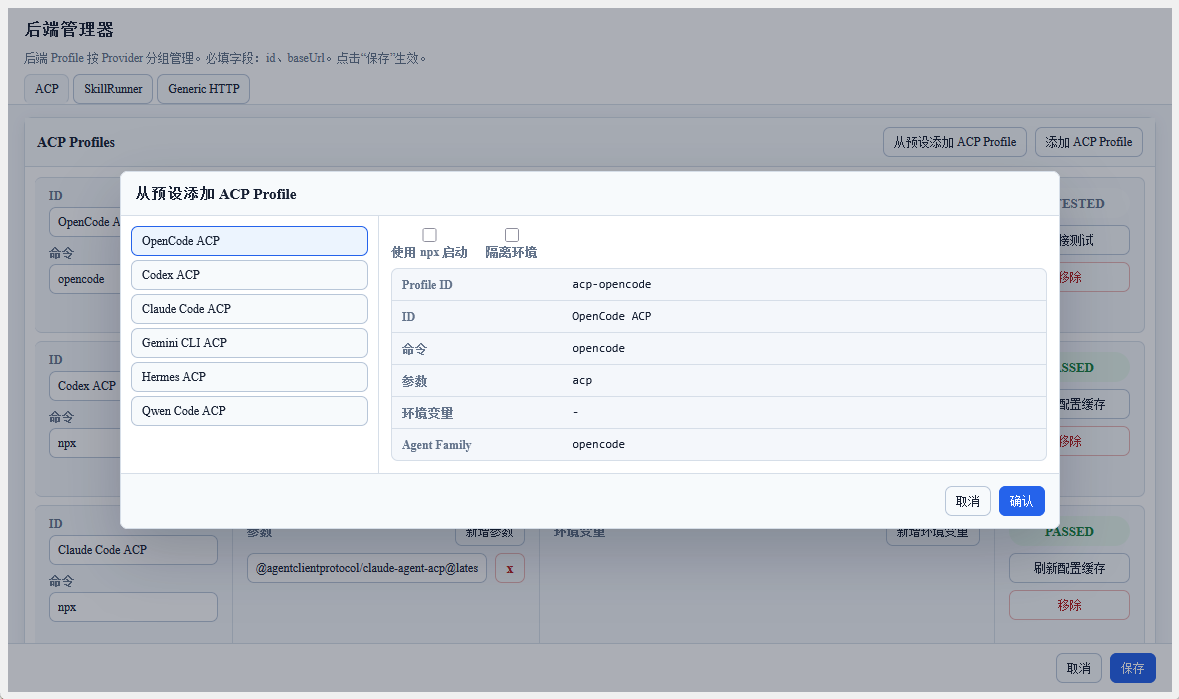
The plugin provides several built-in presets. After clicking Add from Preset, select an agent on the left; the right side shows launch options and a read-only configuration preview.
When Use npx is enabled, the preset switches to the npx <package> launch form and the profile display name gains the (npm) suffix. When Isolated environment is enabled, the profile display name gains the (Isolated) suffix and the plugin injects the documented isolation environment variables or session-directory arguments for that backend.
| Preset | Default command | Description |
|---|---|---|
| OpenCode | opencode acp | OpenCode ACP backend; injects OPENCODE_CONFIG_CONTENT to deny permission questions and supports configuration-directory isolation through OPENCODE_CONFIG_DIR |
| Codex | npx -y @agentclientprotocol/codex-acp@latest | Codex ACP adapter for OpenAI Codex |
| Claude Code | npx -y @agentclientprotocol/claude-agent-acp@latest | ACP adapter for Claude Code |
| Gemini CLI | gemini --experimental-acp | Gemini CLI ACP mode |
| Hermes | hermes acp | Hermes Agent ACP backend |
| Qwen Code | qwen --acp --experimental-skills | Qwen Code ACP mode |
| GitHub Copilot | copilot --acp --stdio | GitHub Copilot CLI ACP mode |
| Qoder CLI | qodercli --acp | Qoder CLI ACP mode; supports documented configuration-directory isolation through QODER_CONFIG_DIR |
| Cursor Agent ACP | cursor-agent-acp | Cursor Agent ACP adapter; supports documented session-directory isolation through --session-dir |
| DeepAgents | deepagents-acp | DeepAgents ACP adapter |
| Auggie | auggie --acp | Auggie ACP mode |
| Kilo | kilo acp | Kilo Code ACP mode; injects KILO_CONFIG_CONTENT to deny permission questions, and core XDG path isolation has been observed for config, data/session/auth/log, and cache state |
| Cline | cline --acp | Cline ACP mode |
| CodeBuddy | codebuddy --acp | CodeBuddy ACP mode |
| Grok | grok agent stdio | Grok agent stdio mode |
Only OpenCode, Codex, Claude Code, Gemini CLI, Qwen Code, and Hermes Agent have been tested. Availability of other ACP backends depends on their backend implementations, and this plugin makes no guarantee. If you encounter problems, adjust command arguments and environment variables yourself, using the ACP protocol and each backend's official documentation as authoritative references.
You can still manually modify any field after selecting a preset.
Free Model Options
Several engines offer free model access — ideal for getting started without any payment:
| Engine | Free Option | How It Works |
|---|---|---|
| Kilo Code | Auto Free mode | Kilo Code's built-in Auto Free mode automatically routes each request to a suitable free model. Enable it in Kilo Code settings — no API key required |
| OpenCode Zen | Built-in free models | The OpenCode Zen edition includes built-in free model access without requiring an API subscription |
| OpenCode + OpenRouter | OpenRouter free models | Configure OpenCode to use OpenRouter and select free-tier models (e.g., Gemini 2.5 Flash, DeepSeek V3). Requires a free OpenRouter account |
Free Tier Limitations
Free models are sufficient for casual use, but be aware of the following constraints:
| Limitation | What to Expect |
|---|---|
| Rate Limiting | Requests may be throttled — typically 5–20 requests per minute depending on provider load. Batch processing slows down significantly |
| Concurrency | Usually limited to a single concurrent request. Running multiple workflows simultaneously may queue or fail |
| Model Availability | Free model pools can be exhausted during peak hours. You may see "model unavailable" or "capacity exceeded" errors |
| Model Rotation | Providers may silently swap free models (upgrade or downgrade) without notice. Output quality may vary between runs |
| No SLA / Reliability | Free tiers offer no uptime guarantee. Services may be temporarily unavailable or discontinued |
If you need reliable batch processing or production use, consider a paid plan such as OpenCode Go ($10/month) or a Coding Plan (Bailian, Zhipu, etc.). The per-paper cost is negligible compared to the time saved.
Environment Variable Configuration Recommendations
Some agents support configuration isolation and session persistence through environment variables or command arguments. Presets with Isolated environment enabled inject the documented values automatically; for manual profiles, add the relevant values yourself:
The OpenCode and Kilo presets also always inject an inline permission configuration: OPENCODE_CONFIG_CONTENT and KILO_CONFIG_CONTENT, respectively, both set to {"permission":{"question":"deny"}}. You can edit or remove these values after adding the preset.
| Setting | Agent | Purpose |
|---|---|---|
OPENCODE_CONFIG_DIR | OpenCode | Specify an independent configuration directory |
CODEX_HOME | Codex | Specify an independent home/configuration directory |
CLAUDE_CONFIG_DIR | Claude Code | Specify an independent configuration directory |
GEMINI_CLI_HOME | Gemini CLI | Specify an independent configuration directory |
HERMES_HOME | Hermes Agent | Specify an independent home/configuration directory |
QODER_CONFIG_DIR | Qoder CLI | Specify an independent configuration directory |
--session-dir <path> | Cursor Agent ACP | Specify an independent session persistence directory |
XDG_CONFIG_HOME, XDG_DATA_HOME, XDG_CACHE_HOME | Kilo | Specify independent XDG roots for configuration, data/session/auth/log, and cache state. This covers the observed core state paths, but does not prove every Kilo subcommand or plugin avoids global directories. |
Request Types
The ACP backend supports two request types:
acp.prompt.v1— Conversational interaction (ACP Chat)acp.skill.run.v1— Skill execution (ACP Skills)
The same ACP backend can be used for both conversations and skill runs simultaneously.
Session Management
- Each backend can have multiple sessions (conversations), which are persistently stored in the plugin database
- Different ACP backends can run simultaneously without interfering with each other
- Sessions can be managed in ACP Chat
Next Steps
After configuration is complete, you can:
- Chat with the backend in Sidebar ACP Chat
- View ACP skill runs in the Dashboard
- Use the ACP backend to execute tasks in the Workflow List