ACP Backend Configuration
What is ACP?
ACP (Agent Client Protocol) is a protocol for communicating with agent backends. Zotero Agents communicates with locally running agent processes (such as Codex, Claude Code, OpenCode, etc.) through the ACP protocol to enable conversations and skill execution.
The ACP backend is the recommended configuration method — as long as you have any ACP-compatible agent tool installed on your machine, you can use it directly with zero additional configuration.
Agent가 처음이신가요?
Agent 도구를 처음 사용하시고 어떤 것을 선택하거나 설치해야 할지 잘 모르시겠다면, 다음 가이드를 참고하세요:
Why ACP First?
- Zero configuration burden: No need to deploy additional services; use the agent tools already on your machine
- Automatic process management: The plugin specifies the launch command in the configuration and automatically manages the agent process lifecycle
- Multi-agent support: Configure multiple different agent backends simultaneously and switch between them as needed
- Configuration isolation: Some agents (such as OpenCode and Codex) support isolating configuration directories and session persistence directories through environment variables
Configuration Steps
- Ensure you have at least one ACP-compatible agent CLI tool installed on your machine
- Open Tools → Backend Manager
- Switch to the ACP tab
- Select your agent tool from the Add from Preset dropdown, or click Add ACP to configure manually
- Fill in the following fields:
- Display Name: A friendly name (e.g., "My OpenCode")
- Command: Command to start the ACP backend (presets auto-fill, but you can also modify manually)
- Arguments: Additional arguments for the command (optional)
- Environment Variables: Additional environment variables (optional, used for configuration isolation, etc.)
- Click Save in the bottom-right corner
Connection Verification
After saving, the plugin automatically detects the backend's capabilities:
- Checks if the command exists
- Connects and initializes
- Retrieves available models and modes
- Computes a configuration fingerprint to detect subsequent changes
If detection fails, verify that the agent CLI is installed correctly and the command format is correct.
지원되는 Agent 프리셋
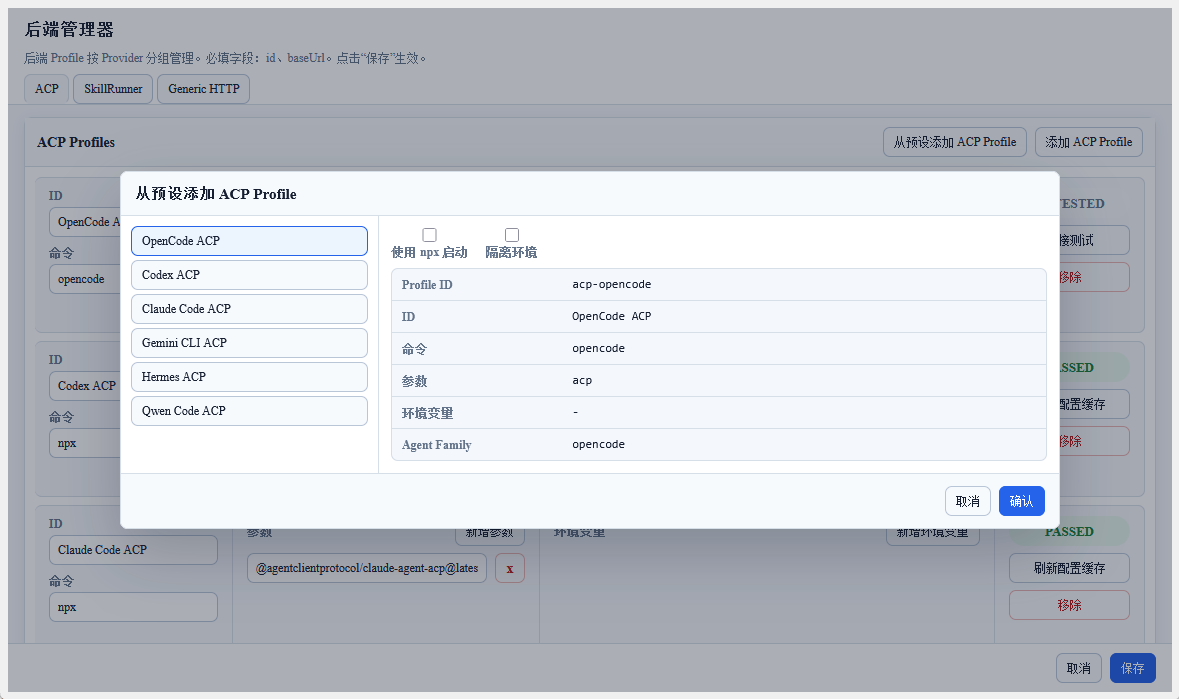
이 플러그인은 여러 내장 프리셋을 제공합니다. 프리셋에서 추가를 클릭하면 왼쪽에서 Agent를 선택하고 오른쪽에 시작 옵션과 읽기 전용 구성 미리보기가 표시됩니다.
npx로 시작을 활성화하면 명령이 npx <package> 형식으로 전환되고 Node.js 및 npm 설치가 필요하다는 안내가 표시됩니다. Codex와 Claude Code는 ACP 어댑터에 의존하므로 기본적으로 npx가 활성화되어 있으며, 다른 Agent는 기본적으로 원시 명령을 사용합니다. npx를 활성화하면 프로필 표시 이름에 (npm) 접미사가 추가됩니다.
격리 환경은 격리를 지원하는 Agent에서만 사용할 수 있습니다. 활성화하면 플러그인이 미리보기에 문서화된 격리 환경 변수 또는 세션 디렉토리 인자를 주입하고, 해당 디렉토리에서 Agent 옵션과 인증을 직접 관리해야 한다는 안내를 표시합니다. 격리를 활성화하면 프로필 표시 이름에 (Isolated) 접미사가 추가됩니다.
| 프리셋 | 기본 명령 | 설명 |
|---|---|---|
| OpenCode | opencode acp | OpenCode ACP 백엔드; OPENCODE_CONFIG_DIR를 통한 구성 디렉토리 격리 지원 |
| Codex | npx -y @agentclientprotocol/codex-acp@latest | OpenAI Codex용 ACP 어댑터 |
| Claude Code | npx -y @agentclientprotocol/claude-agent-acp@latest | Claude Code용 ACP 어댑터 |
| Gemini CLI | gemini --experimental-acp | Gemini CLI ACP 모드 |
| Hermes | hermes acp | Hermes Agent ACP 백엔드 |
| Qwen Code | qwen --acp --experimental-skills | Qwen Code ACP 모드 |
| GitHub Copilot | copilot --acp --stdio | GitHub Copilot CLI ACP 모드 |
| Qoder CLI | qodercli --acp | Qoder CLI ACP 모드; QODER_CONFIG_DIR를 통한 구성 디렉토리 격리 지원 |
| Cursor Agent ACP | cursor-agent-acp | Cursor Agent ACP 어댑터; --session-dir를 통한 세션 디렉토리 격리 지원 |
| DeepAgents | deepagents-acp | DeepAgents ACP 어댑터 |
| Auggie | auggie --acp | Auggie ACP 모드 |
| Kilo | kilo acp | Kilo Code ACP 모드 |
| Cline | cline --acp | Cline ACP 모드 |
| CodeBuddy | codebuddy --acp | CodeBuddy ACP 모드 |
| Grok | grok agent stdio | Grok agent stdio 모드 |
OpenCode, Codex, Claude Code, Gemini CLI, Qwen Code 및 Hermes Agent만 테스트되었습니다. 다른 ACP 백엔드의 사용 가능성은 백엔드 구현에 따라 다르며, 이 플러그인은 보장하지 않습니다. 문제가 발생하면 명령 인수 및 환경 변수를 직접 조정해 볼 수 있으며, ACP 프로토콜과 각 백엔드의 공식 문서를 기준으로 합니다.
프리셋 선택 후에도 모든 필드를 수동으로 수정할 수 있습니다.
Environment Variable Configuration Recommendations
Some agents support configuration isolation and session persistence through environment variables; simply add them in the environment variable editor:
| Environment Variable | Agent | Purpose |
|---|---|---|
OPENCODE_CONFIG | OpenCode | Specify an independent configuration directory |
OPENCODE_SESSION_DIR | OpenCode | Specify a session persistence directory |
CODEX_CONFIG_DIR | Codex | Specify an independent configuration directory |
무료 모델 옵션
여러 엔진이 무료 모델 액세스를 제공합니다 — 비용 없이 시작하기에 이상적입니다:
| 엔진 | 무료 옵션 | 작동 방식 |
|---|---|---|
| Kilo Code | Auto Free 모드 | Kilo Code의 내장 Auto Free 모드는 각 요청을 적절한 무료 모델로 자동 라우팅합니다. Kilo Code 설정에서 활성화 — API 키 불필요 |
| OpenCode Zen | 내장 무료 모델 | OpenCode Zen 에디션은 API 구독 없이 내장 무료 모델 액세스를 포함합니다 |
| OpenCode + OpenRouter | OpenRouter 무료 모델 | OpenCode에서 OpenRouter를 사용하도록 설정하고 무료 등급 모델(예: Gemini 2.5 Flash, DeepSeek V3)을 선택합니다. 무료 OpenRouter 계정이 필요합니다 |
무료 등급 제한 사항
무료 모델은 가벼운 사용에는 충분하지만, 다음 제약 사항을 인지하세요:
| 제한 사항 | 예상되는 영향 |
|---|---|
| 속도 제한 | 제공업체 부하에 따라 분당 5~20회 요청으로 제한될 수 있습니다. 일괄 처리가 크게 느려집니다 |
| 동시성 | 일반적으로 단일 동시 요청으로 제한됩니다. 여러 워크플로를 동시에 실행하면 대기열에 쌓이거나 실패할 수 있습니다 |
| 모델 가용성 | 피크 시간대에 무료 모델 풀이 소진될 수 있습니다. 「모델 사용 불가」또는 「용량 초과」오류가 발생할 수 있습니다 |
| 모델 교체 | 제공업체가 사전 통지 없이 무료 모델을 조용히 교체(업그레이드 또는 다운그레이드)할 수 있습니다. 실행 간 출력 품질이 달라질 수 있습니다 |
| SLA / 신뢰성 없음 | 무료 등급은 가동 시간을 보장하지 않습니다. 서비스가 일시적으로 중단되거나 종료될 수 있습니다 |
안정적인 일괄 처리나 프로덕션 사용이 필요한 경우, OpenCode Go(월 $10) 또는 Coding Plan(Bailian, Zhipu 등)과 같은 유료 플랜을 고려하세요. 논문 한 편당 비용은 절약되는 시간에 비하면 미미합니다.
Request Types
The ACP backend supports two request types:
acp.prompt.v1— Conversational interaction (ACP Chat)acp.skill.run.v1— Skill execution (ACP Skills)
The same ACP backend can be used for both conversations and skill runs simultaneously.
Session Management
- Each backend can have multiple sessions (conversations), which are persistently stored in the plugin database
- Different ACP backends can run simultaneously without interfering with each other
- Sessions can be managed in ACP Chat
Next Steps
After configuration is complete, you can:
- Chat with the backend in Sidebar ACP Chat
- View ACP skill runs in the Dashboard
- Use the ACP backend to execute tasks in the Workflow List