Creating Topic Synthesis
What Is Topic Synthesis?
Topic Synthesis is the process of systematically analyzing and synthesizing a group of related literature. It automatically extracts key information, identifies topic structures, and generates comprehensive analysis reports through AI workflows.
Topics Surface
On the Synthesis Workbench → Topics page, you can browse and manage all created topics. The Topics surface supports three view modes:
| View | Description | Use Case |
|---|---|---|
| Graph View | Force-directed graph with topics as nodes and relationships as edges | Intuitively understand inter-topic associations |
| Grid View | Cards with title, paper count, summary, and action buttons | Browse and find topics |
| List View | Table view with columns: name, paper count, creation time, update date, status | Sorting and batch operations |
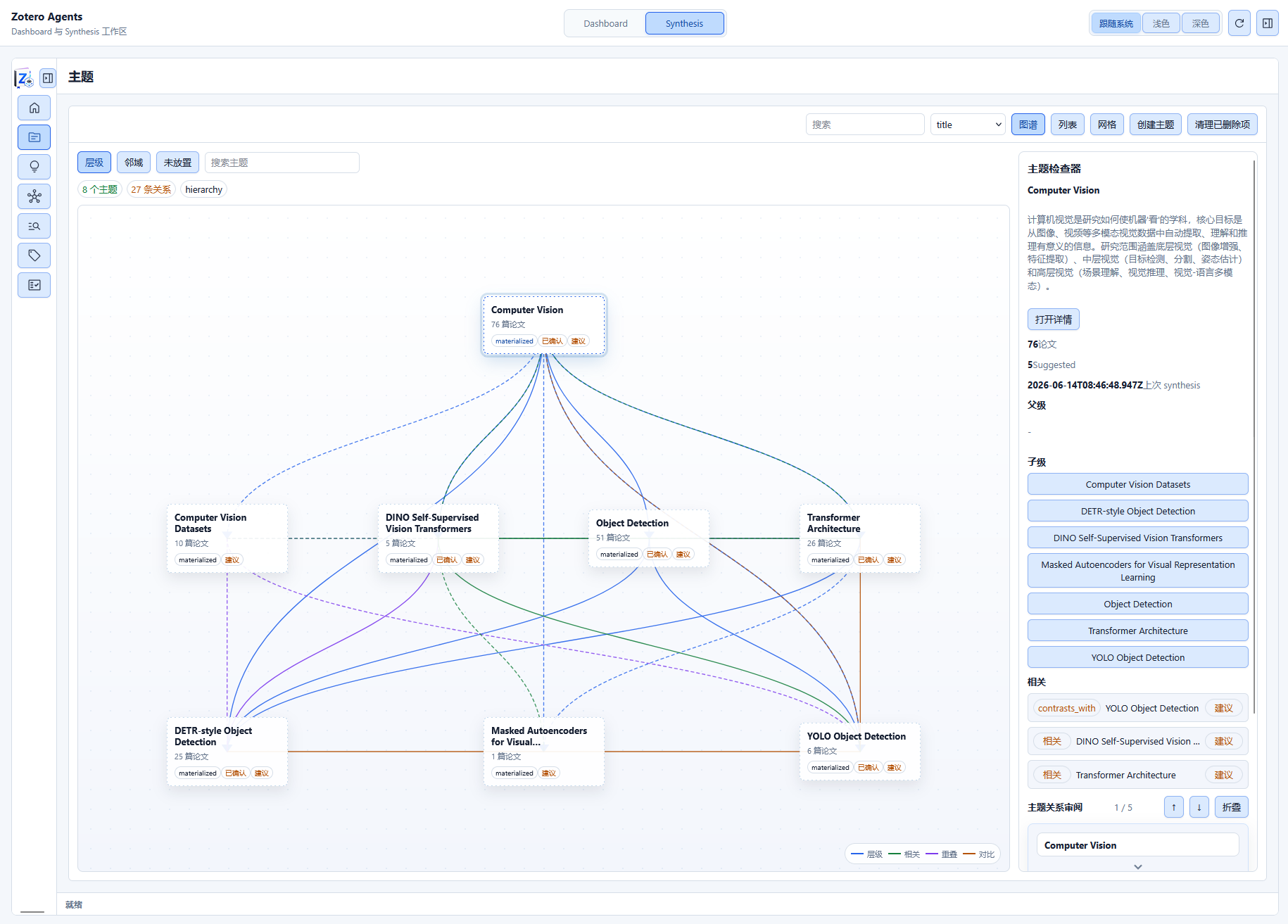
Topic Management Operations
- Search: Search by topic name and description
- Sort: Sort by title, paper count, or update date
- Create New Topic: Click the create button to start the workflow pipeline
- Update Topic: Re-run the pipeline to update the topic analysis
- Delete Topic: Remove topics that are no longer needed
Creation Process
Topic creation is driven by workflows and is a multi-step automated pipeline:
1. create-topic-prepare
   → Collect literature data, build paper set

2. topic-synthesis-core-enrichment
   → Core enrichment: extract information, associate knowledge

3. topic-synthesis-finalize
   → Generate final analysis artifacts and reports

(update-topic-synthesis-prepare is used to update existing topics)
Prerequisites
- Skill-Runner backend configured
- Relevant papers in the library
- Papers have generated digests and citation analysis (optional, recommended)
This pipeline is orchestrated by the Topic Synthesis Creation workflow.
Topic Inspector
After creating a topic, click on it to enter the Topic Inspector. This is a multi-page reader containing 8 sub-pages, each presenting a different dimension of the topic.
Overview
- Topic name, description, importance score
- Core claims summary
- Statistics (paper count, category count, claim count, etc.)
- Associated Topic Graph location information
Taxonomy
Displays the hierarchical classification structure of the topic:
- Broader topics: Broader topic areas
- Narrower topics: More specific sub-topics
- Related topics: Other associated topics
- Position and hierarchy in the Topic Graph
Claims
Core claims and assertions extracted from the literature:
- Each claim includes original evidence citations
- Marks the papers from which claims originate
- Claim type (findings / hypotheses / conclusions, etc.)
- Number of papers supporting the claim
Compare
Comparison of viewpoints across different papers on the same topic:
- Comparison dimensions (methods, conclusions, datasets, etc.)
- Each paper's stance and arguments
- Visualization of consensus and divergence
Future Directions
Research gaps and future directions identified through literature analysis:
- Open questions
- Potential research directions
- Related challenges and recommendations
Coverage
Analyzes the degree to which the topic covers relevant literature:
- List of papers covered by the topic
- Paper completeness (whether digests/citation analysis artifacts exist)
- Aspects covered and aspects not covered
References
All references associated with the topic, including binding details:
- Zotero item link for each citation
- Citation role in the topic (support / contrast / background)
- Citation source and context
Report (Full Report)
The generated structured synthesis analysis report (in Markdown format):
- Complete topic analysis text
- Can be exported as Markdown or self-contained HTML
- Suitable for use as reference material in academic writing
Topic Graph
The Topic Graph is a hierarchical topic network showing relationships between topics:
Node Types
| Type | Description |
|---|---|
| materialized | Structured topics that have been actually created |
| placeholder | Topic placeholders inferred to exist but not yet created |
Edge Status
| Status | Description |
|---|---|
suggested | System-suggested relationships (pending review) |
confirmed | User-confirmed relationships |
rejected | User-rejected relationships |
stale | Stale data, pending re-evaluation |
deleted | Deleted relationships |
Relationship Types
| Relationship | Description |
|---|---|
broader_than | A is a broader topic than B |
related_to | Two topics are related |
overlaps_with | Two topics overlap |
contrasts_with | Two topics contrast with each other |
Managing Topics
- Create New Topic: Click "Create" on the Topics page
- Edit Topic: Modify name, description, importance, etc.
- Associate Papers: Add or remove papers from a topic
- Browse Topic Graph: View the relationship network between topics
Related Workflows
- Topic Synthesis Creation — Workflow details for creating topics
- Manuscript Literature Framing — Write papers based on topic analysis