Index & Citation Graph
Index Surface
On the Synthesis Workbench → Index page, you can manage the Canonical Reference Index. The Index surface contains two sub-views:
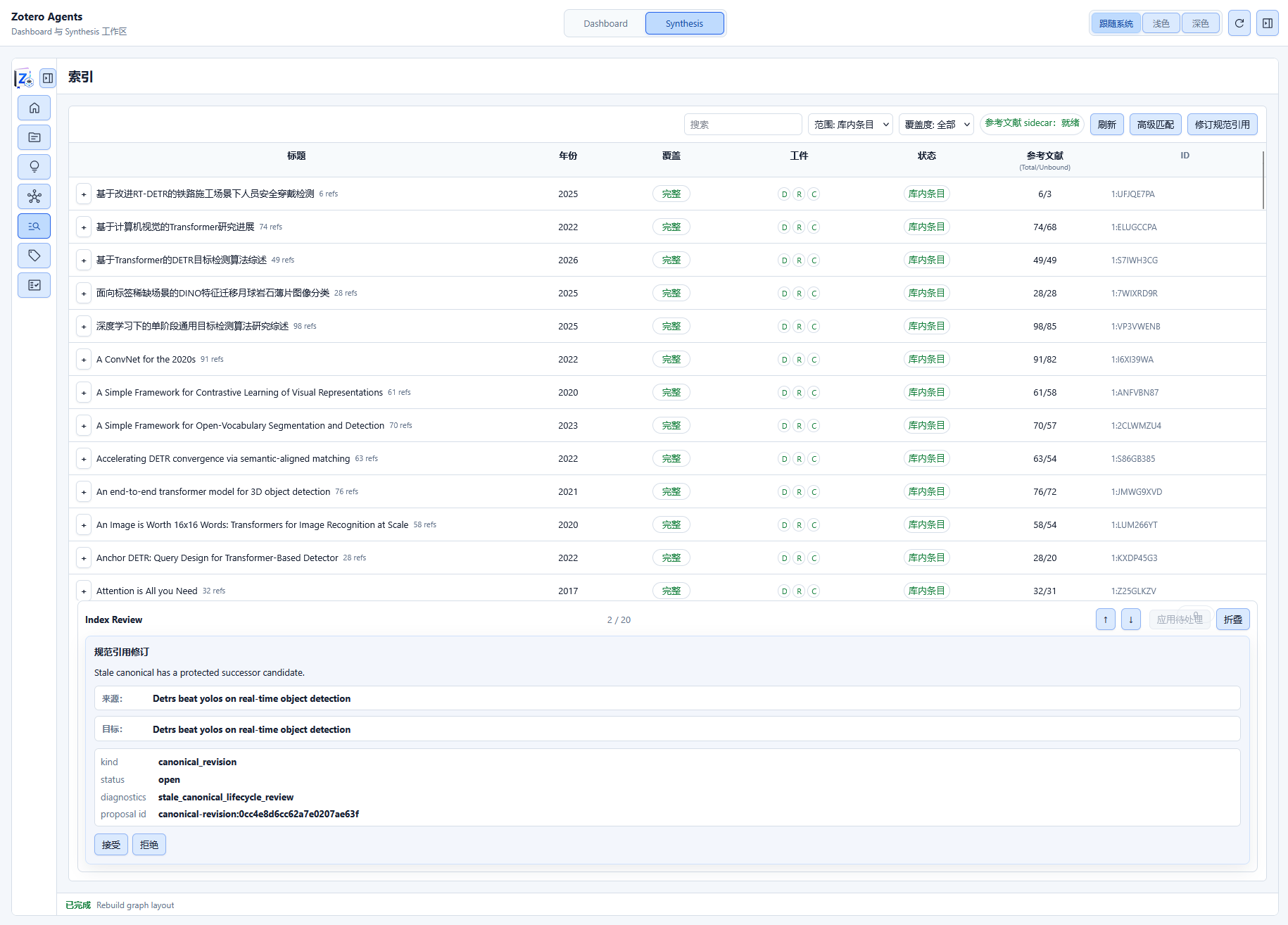
Registry View
Displays a list of all tracked papers in the library, with each row showing a paper and its coverage status:
- Paper Information: Title, author, year
- Coverage: Complete / Partial / Missing (coverage status of the three artifact types: digest, references, citation analysis)
- Expand Row: When expanded, shows the paper's reference list, with each citation marked by its binding status (unbound / candidate / accepted / rejected)
- Filter: Filter by scope (all / library / cited), coverage, or search
Canonical Reference View
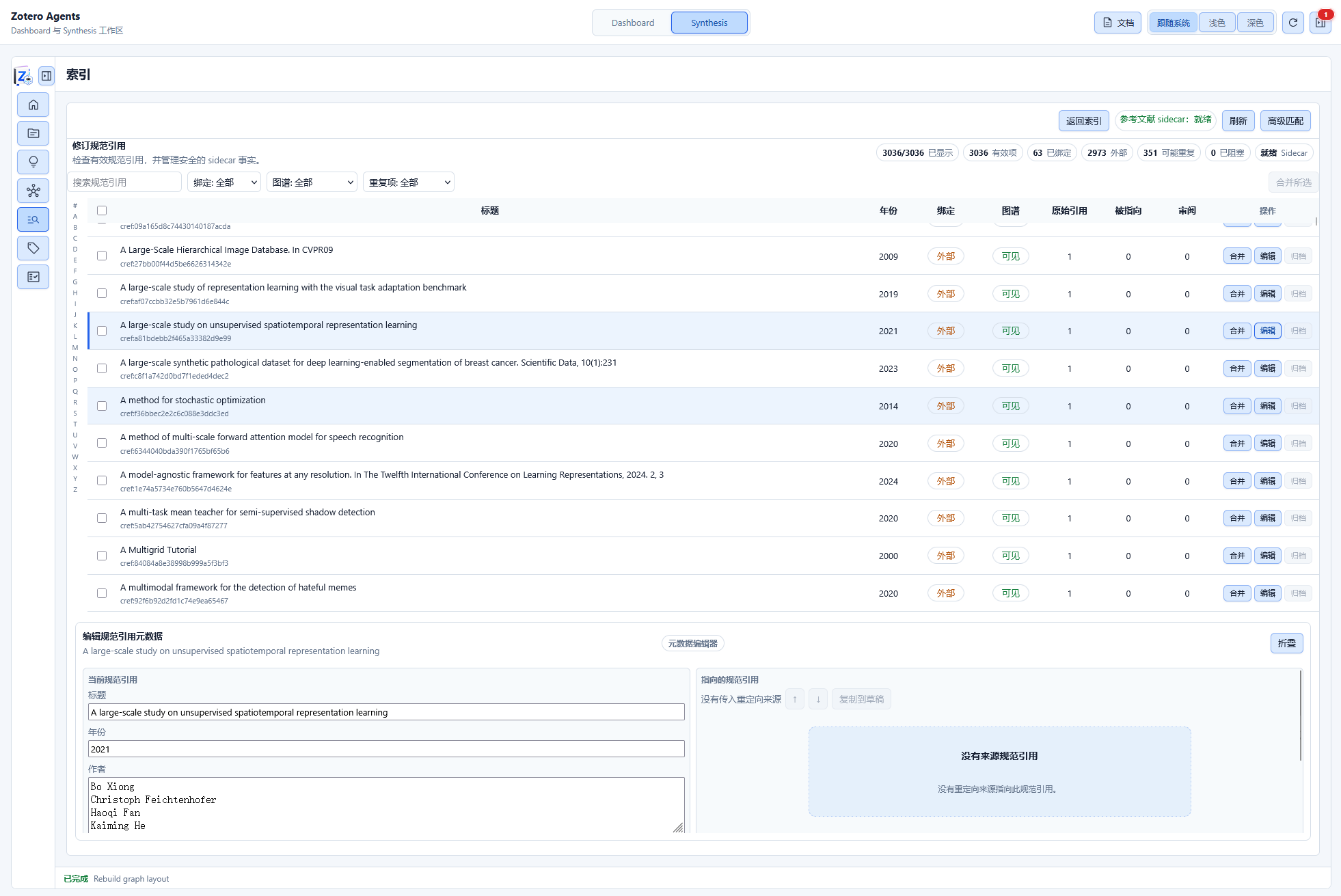
Displayed when the active indexing tool is switched to "Revise Canonical":
- Canonical Reference List: Deduplicated canonical reference records
- Search & Filter: Filter by binding status, graph visibility, redirect status, or whether duplicate candidates exist
- Actions: Metadata editing, merge duplicate references, create redirects, view review items
Canonical Reference Index
The Canonical Reference Index is the core index of the Synthesis system, performing deduplication and canonicalization of all references from papers in the library. It obtains raw citation data from the Reference Sidecar (see the "Reference Sidecar" section in Overview) and forms the index through extraction, canonicalization, and match binding.
Features
- Full-text Search: Search across all canonicalized references
- Metadata Editing: Modify citation record metadata
- Merge: Merge duplicate reference records (automatically creates redirects)
- Redirect: Point one reference to another canonical record
- Review: View quality review items for citation matching
- Deduplication: Discover potential duplicate references
Reference Record Types
| Type | Description |
|---|---|
| Bound | Associated with an item in the Zotero library |
| External | Known literature not in the current Zotero library |
| Unresolved | Extracted from references but not yet identified |
Reference Matching Pipeline
Reference matching is the process of automatically establishing associations between references extracted from papers and items in the Zotero library. The system uses a two-stage model to balance performance and accuracy.
Two-Stage Model
Stage 1: Lightweight Sidecar Refresh
Runs during regular operations (e.g., after digest application), scans sidecar status, compares citation artifact hashes, and only processes references that have changed. Does not run advanced deduplication or index building, only performs lightweight canonical assignment and binding.
- Trigger: After workflow execution completes and writes artifacts, or via explicit refresh operation
- Scope: Incremental (only changed references)
- Algorithm: Simple identifier matching (DOI, arXiv, ISBN)
Stage 2: Advanced Citation Matching
An explicitly triggered deep matching operation. Builds a complete citation match index and runs comprehensive matching and deduplication algorithms.
- Trigger: Manual trigger by user, periodic maintenance
- Scope: Full
- Algorithm: Multi-strategy matching + clustering deduplication
Advanced citation matching, refreshing the index, and rebuilding the Citation Graph are computationally intensive. Since Zotero uses a single host process architecture, these operations may cause brief UI stutters during execution. Please be patient. This issue is planned to be addressed in a future architectural refactoring.
Matching Strategies
| Strategy | Match Basis | Confidence | Description |
|---|---|---|---|
| DOI Matching | DOI identifier | Deterministic | Exact match, auto-accepted |
| arXiv Matching | arXiv ID | Deterministic | Exact match, auto-accepted |
| ISBN Matching | ISBN number | Deterministic | Exact match, auto-accepted |
| Title Similarity | Fuzzy title matching | High / Medium / Low | Uses standardized titles and compact titles for similarity calculation |
| Author + Year | Author names and publication year | Medium / Low | Combines author normalization and year range for matching |
Confidence Levels
| Level | Description | Recommended Action |
|---|---|---|
deterministic | Deterministic match | Auto-accept |
high | High confidence | Acceptable |
medium | Medium confidence | Recommend review |
low | Low confidence | Requires review |
review | Requires human judgment | Must review |
Clustering Deduplication
The advanced matching stage performs clustering deduplication on canonical references. The algorithm process:
- Build a deduplication record for each canonical reference (including eligibility filtering and bibliographic noise analysis)
- Pairwise comparison produces cluster edges (identifier exact match, title canonical match, fuzzy title match, etc.)
- Edges are aggregated into clusters and sub-clusters
- Generates automatic redirects or review proposals for deduplication
Safety constraint: Low-confidence matches (e.g., contained_extension_risk) never trigger automatic redirects and require user review.
Review Surface
In the Review Hub, you can view and process citation match proposals, accepting or rejecting them one by one.
Citation Graph
The Citation Graph visualizes the papers in the library and their references as a network graph. The graph data is built as a SQLite projection and can tolerate a certain degree of data staleness (not a real-time mirror).
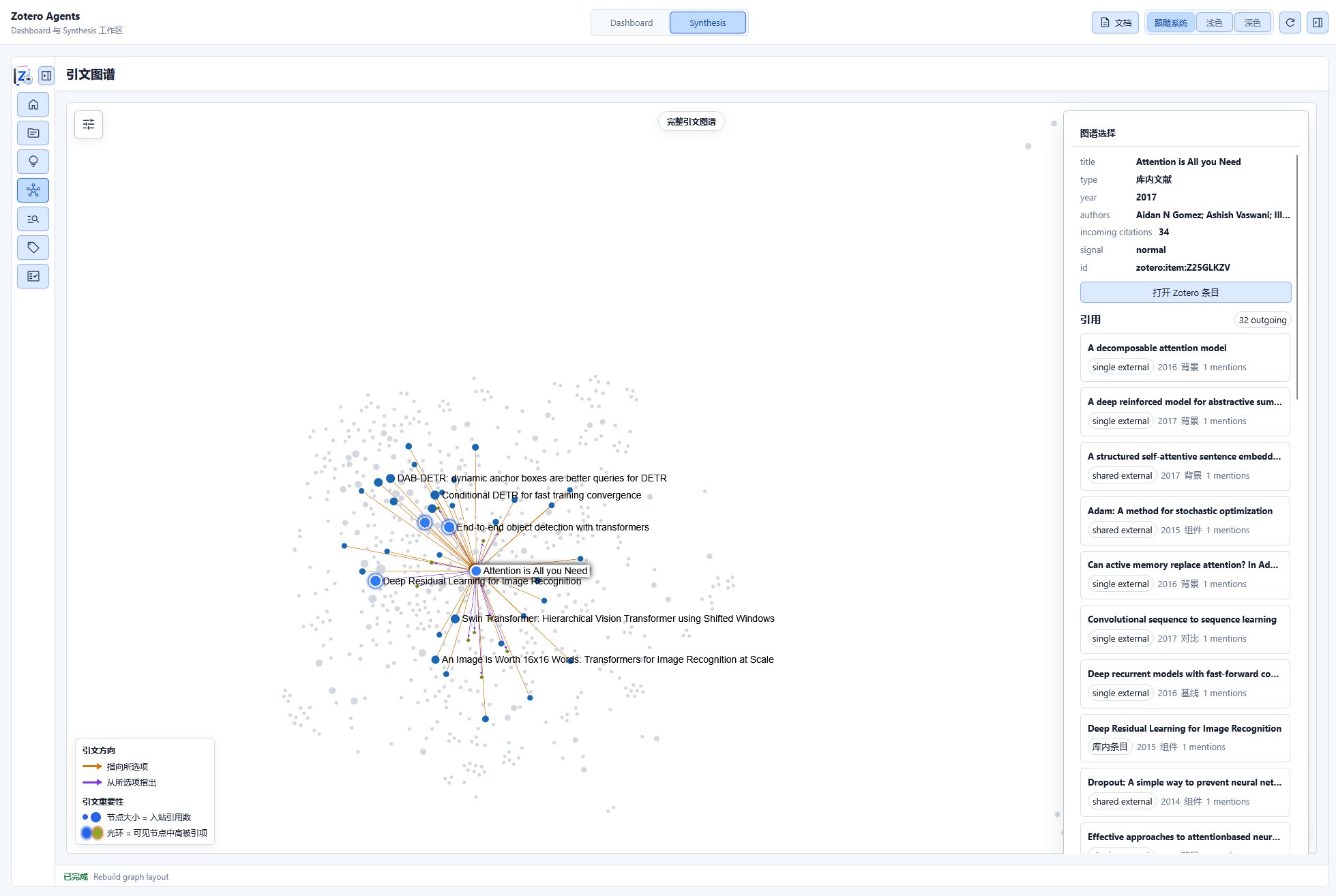
Node Types
| Node | Color | Description |
|---|---|---|
library_paper | Blue | Papers already in the Zotero library |
external_reference | Green | Known references not in the library |
unresolved_reference | Gray | Extracted but unidentified references |
Edge Information
Each citation edge contains:
- mention_count: Number of times cited
- primary_role: Primary citation role (e.g., background, comparison, support, contrast)
- aux_roles: List of auxiliary roles
- role_evidence: Basis for role determination
Graph Metrics
The citation graph can calculate various metrics to help identify core papers and influential works:
| Metric | Description |
|---|---|
| Citation Count | Total number of times a paper is cited |
| PageRank | Node importance score based on graph structure |
| Foundation Score | Degree to which it serves as foundational work in the field |
| Frontier Score | Degree to which it represents frontier work |
Visualization Layouts
| Layout | Description | Use Case |
|---|---|---|
| Force (Force-Directed) | d3-force layout | Explore overall structure |
| Radial | Expand around a selected node | Analyze a paper's citation network |
| Components | Group by connected components | Discover independent citation clusters |
Interactive Operations
- Zoom / Pan: Freely browse the graph
- Hover: View node labels and basic information
- Click Node: Open the corresponding paper item in Zotero
- Filter: Filter displayed citations by role, topic, or node type
- Toggle Low-Signal Citations: Show/hide low-citation-count edges
- Depth Slider: Control the expansion depth of the citation network
Topic Filtering
You can filter the citation graph by topic to show only papers and citation relationships related to specific topics. Topic scopes are displayed in the graph with different colors and groupings.
Next Steps
- Review Hub — Review citation match and deduplication proposals
- Create Topic Synthesis — Create topic analyses based on citation networks
- Home Dashboard — View library insight metrics
- WebDAV Sync — Sync citation binding data across devices