Home Dashboard
Home is the first page you see when opening Synthesis Workbench. It provides a comprehensive overview of your library, sync status, and quick access to trending topics.
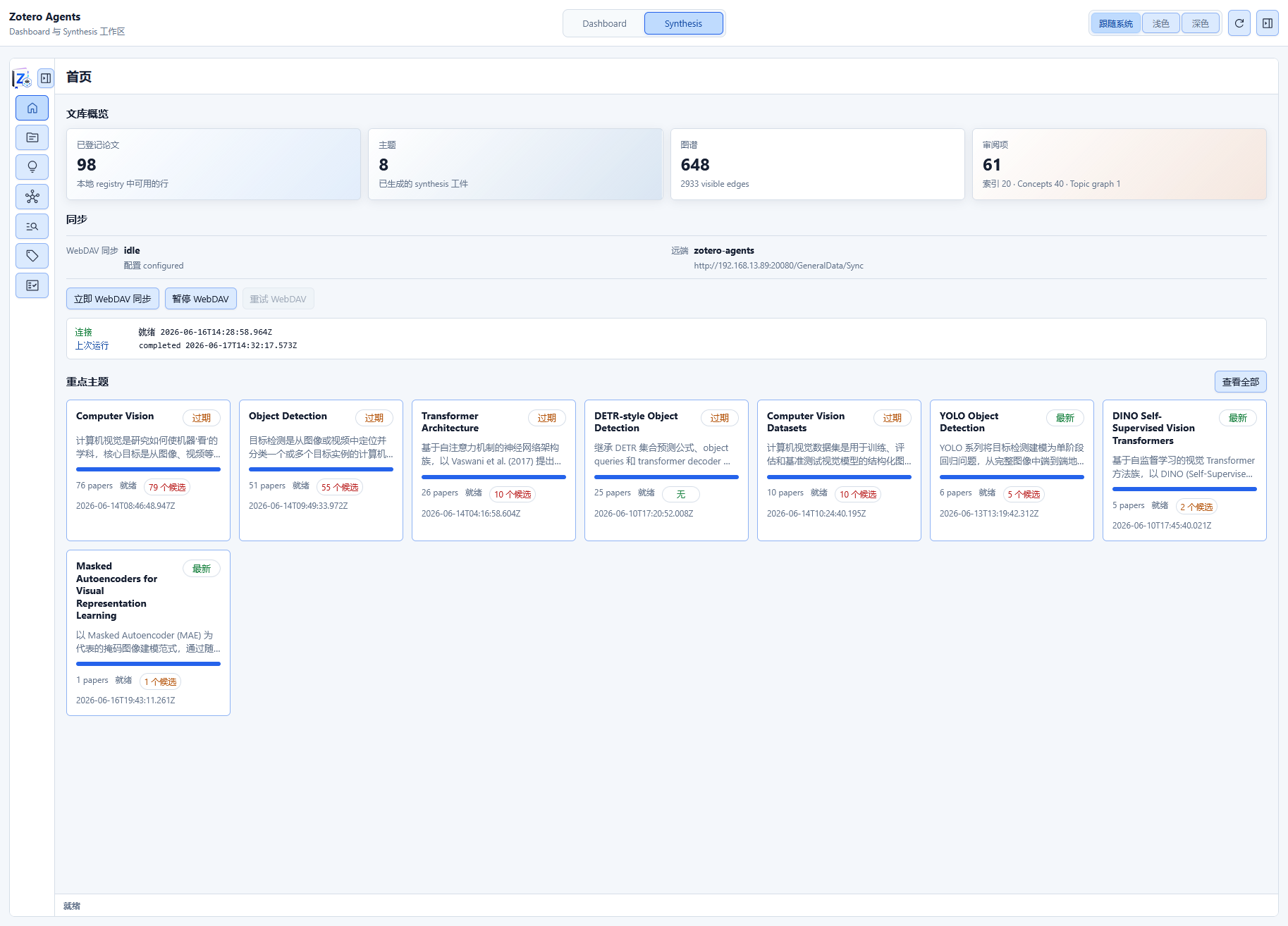
Library Insights Cards
The top of the page displays a set of statistics cards showing the current state of the Synthesis system:
| Metric | Description |
|---|---|
| Registered Papers | Total number of papers included in the Canonical Reference Index |
| Topic Count | Number of topic syntheses created |
| Graph Nodes | Total number of nodes in the citation graph (library papers + external references) |
| Graph Edges | Total number of citation relationships in the citation graph |
| Sync Status | Running status of WebDAV/Git sync |
These metrics help you quickly understand the structuring level and synthesis progress of your library.
Sync Panel
If WebDAV Sync (recommended) or Git Sync (deprecated) is configured, the Home page displays a sync status panel:
WebDAV Sync
- Sync Status: idle / queued / syncing / blocked_conflict / failed
- Last Sync Time
- Remote HEAD Identifier
- Action Buttons: Manual sync, pause/resume, retry
When conflicts occur, the panel displays conflict details and action options (keep_local, clear_after_manual_edit).
For detailed configuration and usage of WebDAV sync, see WebDAV Sync.
The auto-sync feature of WebDAV sync has not been thoroughly tested. It is recommended to use manual sync only at this stage, and enable auto-sync after it is improved in a future release.
Git Sync (Deprecated)
See Git Sync for historical reference.
Review Items Panel
The Home page can display a quick preview of pending review items:
| Review Category | Description |
|---|---|
| Citation Matches | Pending citation-item binding proposals |
| Concepts | Pending concept, sense, and alias suggestions |
| Topic Graph Relationships | Pending inter-topic relationships |
| Tag Suggestions | AI-suggested tags awaiting approval |
Each category displays a badge with the number of pending items. Click to navigate to the corresponding sub-tab in the Review Hub.
Trending Topics
The lower section of the page displays a card list of trending topics, sorted by the number of associated papers. Each card contains:
- Topic Name — Click to enter the topic detail page
- Paper Count — Number of papers covered by the topic
- Summary Preview — Topic description excerpt
- Action Buttons — Open topic, update topic
When there are multiple active topics, use the "View All" link to browse the complete list on the Topics page.
Next Steps
- WebDAV Sync — Configure cross-device sync for Synthesis data
- Review Hub — Handle citation match, concept, and topic graph review items
- Index & Citation Graph — Manage the Canonical Reference Index