Tags Management
What Is Tag Vocabulary?
Tag Vocabulary is a standardized tagging system used for consistent annotation of literature. Unlike Zotero's native free-form tags, tags in a controlled vocabulary follow unified naming conventions, which facilitates statistics and retrieval.
Facets
Each tag belongs to a Facet (dimension). The following facets are currently supported:
| Facet | Description | Example |
|---|---|---|
field | Research field | field:natural_language_processing |
topic | Research topic | topic:transformer_architecture |
method | Research method | method:reinforcement_learning |
model | Model used | model:gpt-4 |
ai_task | AI task type | ai_task:text_summarization |
data | Dataset | data:imagenet |
tool | Tool | tool:python |
status | Workflow pending action | status:need-analysis |
Tag format: ^[a-z_]+:[a-zA-Z0-9/_.-]+$, maximum 120 characters.
Vocabulary Tab
On the Synthesis Workbench → Tags → Vocabulary page, you can:
- View: All defined canonical tags, showing status, facet, aliases, and usage count
- Add: Create new canonical tags
- Edit: Modify tag metadata
- Deprecate: Mark a tag as deprecated, optionally specifying a replacement tag
- Import JSON: Import a tag vocabulary from a JSON file (supports preview before confirmation)
- Export JSON: Export the current vocabulary to a JSON file
The five builtin workflow statuses are initialized when the plugin starts. Their tag, facet, source, deprecation state, and replacement cannot be changed or deleted; notes remain editable and aliases continue to use the normal governance path. Custom status:* entries retain the same management controls as other custom vocabulary entries. Imports may update builtin notes and aliases, but omitting a builtin or changing its protected identity cannot remove or replace it.
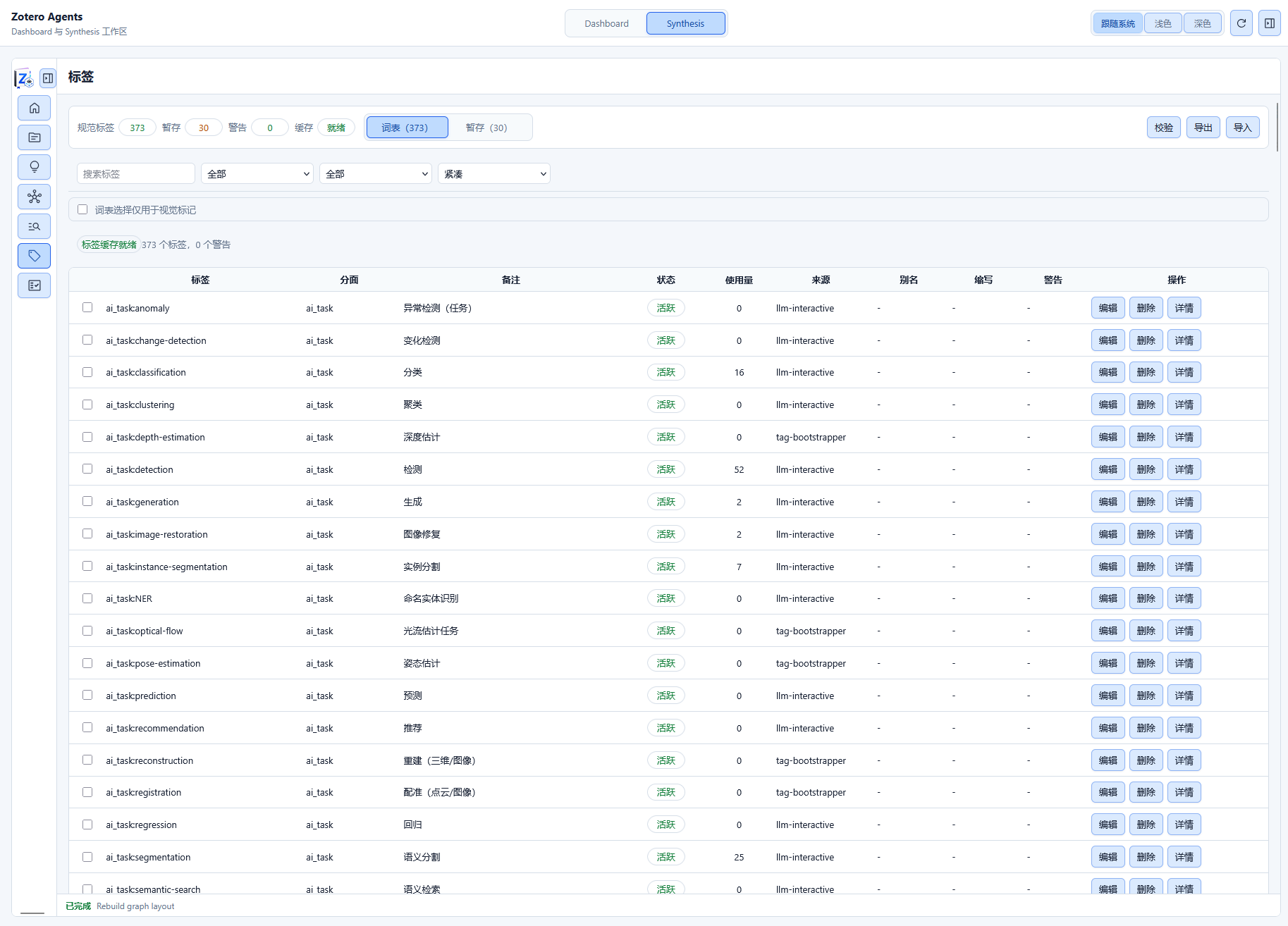
Tag statuses:
active: Activedeprecated: Deprecated (has a replacement tag)warning: Warning (may need review)
Staged Tab (Pending Tags)
The tag-regulator skill automatically analyzes literature metadata and generates controlled tag suggestions, displayed on the Staged page.
Approval Workflow
- Review the list of suggested tags
- For each tag, you can:
- Promote: Add the tag to the canonical vocabulary
- Discard: Reject the suggestion
- Clear Staged: Batch-discard all suggestions
Import/Export Format
The tag vocabulary supports JSON format import/export (TagVocab format), enabling:
- Cross-library migration of tag systems
- Team sharing of tag conventions
- Backup and version control
Related Workflow
status is a workflow to-do facet, not a reading-progress axis. An item may have zero or several status tags. The plugin owns these definitions:
status:need-metadata-curationstatus:need-fulltextstatus:need-markdownstatus:need-analysisstatus:need-deep-reading
You do not need to run Tag Bootstrapper to create them. Tag Bootstrapper only adds custom vocabulary entries, while Tag Regulator may audit ordinary controlled tags but cannot add or remove builtin workflow statuses on literature items. Neither workflow may infer a builtin status from a paper's topic, language, metadata, or full text.
| Event | Add to item | Remove from item |
|---|---|---|
| Search creates an item | Markdown, analysis, and deep-reading; metadata/fulltext when the result requires them | — |
| Search reuses an item | Only metadata/fulltext explicitly required by this result | — |
| Metadata Curator succeeds or verifies no change | — | Metadata curation |
| MinerU writes and attaches Markdown | — | Markdown and fulltext |
| Literature Analysis writes formal artifacts | — | Analysis |
| Literature Deep Reading writes and attaches HTML | — | Deep reading |
Failed, skipped, canceled, or unapplied runs do not clear status. If an artifact succeeds but status cleanup fails, the artifact remains and the run reports a partial warning. Manually attaching a PDF does not automatically clear status:need-fulltext.