SkillRunner Tab
The SkillRunner tab is used to view and interact with runs executed through the Skill-Runner backend. Unlike ACP Skills which focuses on one-off skill execution, the SkillRunner tab emphasizes management of interactive sessions.
Interface Overview
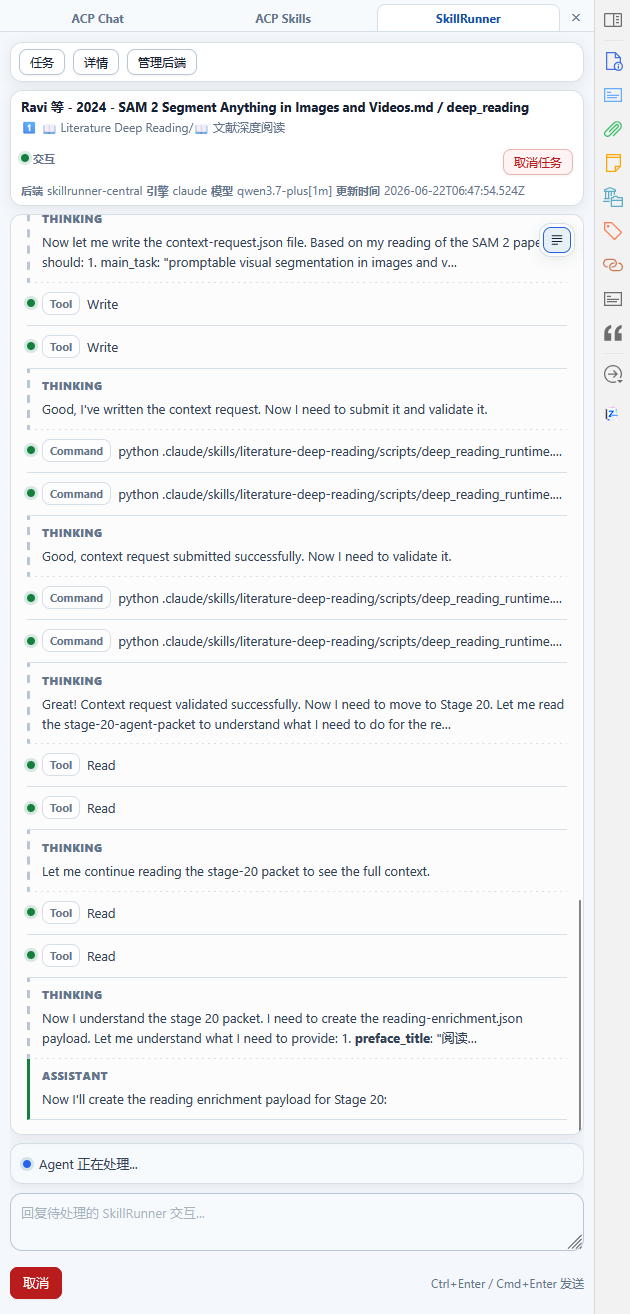
┌─────────────────────────────────────┐
│  Banner: Title / requestId / Status    │
├─────────────────────────────────────┤
│  ← Task Drawer  │  Main Content Area   │  Details → │
│               │  Transcript View            │
│  Running      │  Plan Component             │
│  └─ backend1  │  Prompt Component           │
│     └─ task A │  Reply Area                 │
│  Completed    │                             │
│  └─ backend1  │                             │
│     └─ task B │                             │
└─────────────────────────────────────┘
Banner
The Banner displays information about the currently selected task:
- Title: Task name or skill identifier
- Request ID: Unique request identifier for the task
- Status: Run status (running / waiting_user / waiting_auth / completed / failed)
- Backend: Backend information
- Engine: The engine in use (e.g., gemini, claude, etc.)
- Model: The model in use
- Updated: Last update time
- Cancel Task Button
Task Drawer (Left)
The left drawer displays all SkillRunner tasks, divided into Running and Completed groups. Each task entry shows summary information, a status indicator, and an archive action. Click an entry to switch to that task's detail view.
Main Content Area
Transcript View
The SkillRunner transcript view uses a Thinking chat model that intelligently handles continuous reasoning:
- Thinking Blocks: The AI's reasoning process is displayed as separate thinking blocks
- Tool Calls: Shows tool name, input summary, and execution status
- Messages: Assistant and user conversation messages
- Revision: Output version change records
Also supports Plain / Bubble display modes.
Authentication Workflow
The SkillRunner tab supports authentication workflows, allowing backend authentication to be completed without leaving the panel:
Authentication Triggers:
- Automatically triggered when running a skill that requires authentication
- The prompt component displays an authentication request
Supported Authentication Methods:
| Method | Description | Use Cases |
|---|---|---|
| OAuth Proxy | Complete the OAuth flow via browser | Recommended method, for engines that support OAuth |
| Auth Code Input | Manually enter an authentication code or URL | When the engine has generated an authentication link |
| File Import | Import a credentials file | When a credentials file is already available |
| Inline TUI | Launch a terminal directly in the panel | When interactive login is required |
Authentication Flow Example (OAuth):
- Run detects that authentication is required
- Prompt component shows "Authentication required" and available authentication methods
- User selects OAuth proxy
- Browser opens the OAuth page
- User completes authentication
- Run automatically resumes execution
Prompt Component
| Status | Display Content |
|---|---|
waiting_user | Awaiting user input; shows context description and quick options (if available) |
waiting_auth | Awaiting authentication; shows authentication method selection and input |
running | In-progress indicator |
completed | Completion status confirmation |
error | Error information and troubleshooting suggestions |
Reply Area
- Text Input Box: Enter reply content
- Send/Cancel Button
Unlike ACP Skills, the SkillRunner tab's reply area does not have mode/model/reasoning selectors (these are configured in the backend settings).
Details Drawer (Right)
| Area | Content |
|---|---|
| Run Metadata | Title, requestId, taskKey, status, terminal/waiting flags |
| Backend Info | backend, engine, model |
| Updated Time | Last active time |
| Interaction Info | Current pending interaction information (if any) |
| Session Summary | Historical session summary |
| Revision Summary | Output version change records |
Related Configuration
Before using the SkillRunner tab, a Skill-Runner backend must be configured.