Interactive Literature Explainer
Purpose
Engage in multi-turn dialogue with AI to deeply understand literature content. Supports free-form Q&A grounded in the literature context, and automatically generates structured study notes after the conversation ends.
AI responses must pass through a verification gate. Answers with uncertainty are explicitly flagged, so you can confidently discuss paper details with the AI.
Use Cases
- Encountering concepts or terminology you don't understand while reading a paper
- Wanting to dive deeper into a specific part of the paper (methods, experiments, derivations)
- Working with AI to trace the paper's reasoning and contributions
Input Constraints
| Constraint Type | Description |
|---|---|
| Input Unit | Attachment |
| Accepted Types | text/markdown, text/x-markdown, text/plain, application/pdf |
| Per-parent limit | At most 1 attachment |
Trigger Methods
- Directly select a PDF or Markdown attachment
- Select the parent item, and the plugin will automatically expand its first qualifying attachment
Execution Flow
1. Build Request
   └── Upload source file to Skill-Runner
       └── Invoke skill_id: "literature-explainer"

2. Skill-Runner Processing
   └── Launch interactive mode
       └── Open Dashboard chat panel

3. User Interaction
   └── Converse with AI in Task Dashboard
       └── Send messages, view replies

4. End Conversation
   └── User manually closes or cancels
       └── Generate conversation results
Interaction Flow
- After the workflow starts, the Task Dashboard automatically opens the chat panel
- Type questions or instructions in the chat input
- AI replies are displayed in real-time in the panel
- The conversation can continue until the user chooses to end it
- Closing the panel triggers result processing
Estimated Duration
Depends on the number of conversation turns. Literature loading and initialization takes approximately 1-2 minutes, after which the conversation proceeds in real-time.
Model Recommendation
🟡 Models with web search capability are recommended. Literature Explainer has a built-in evidence verification mechanism — if the model can search the web to verify citations and facts in the paper, verification quality improves significantly. When web access is unavailable, the verification feature is severely limited, but reasoning and Q&A based on literature content is still possible.
Outputs
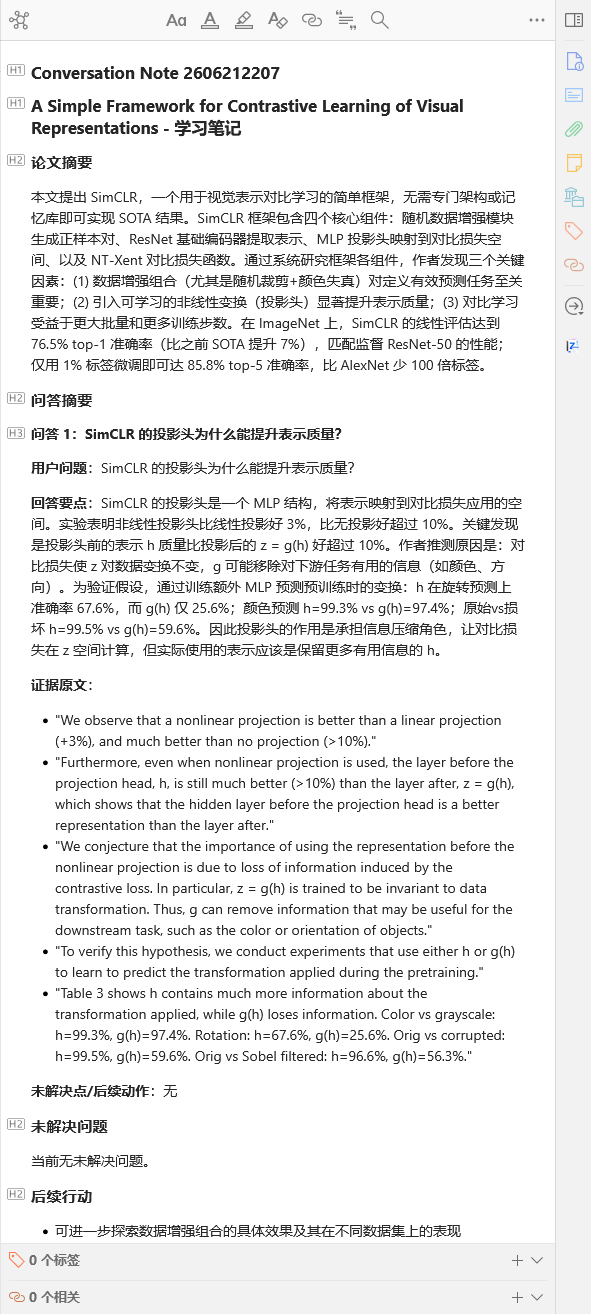
After execution completes, 1 Study Note (Conversation Note) is created under the parent item:
- Type:
data-zs-note-kind="conversation" - Content: Q&A history (HTML format), which can be kept as study notes
- Update strategy: Each execution creates a new conversation note (rather than overwriting)
Parameters
| Parameter | Type | Description | Default |
|---|---|---|---|
language | string | Conversation language | zh-CN |
Available values: zh-CN, en-US, ja-JP, ko-KR, de-DE, fr-FR, es-ES, ru-RU. Custom input is also supported.
Dependencies
- Backend: Skill-Runner service
- Backend Configuration: Configure a Skill-Runner type backend in Backend Manager
- Skill: The
literature-explainerskill must be deployed on the Skill-Runner
Related Workflows
- Literature Analysis — Automatically generate literature digests (recommended to run first)
- Deep Reading — Generate a structured deep reading view